Let the Machine Draw It: Using AI to Visualize Algorithms
TLDR: A static diagram tells you the shape of an algorithm. An interactive emulator tells you how it behaves — and behavior is where the bugs and the design decisions live. LLMs have quietly made these emulators nearly free to build. I described a rolling-canary routing scheme in a couple of sentences, and a few iterations later had a live, scrubbable simulator of it. The artifact outlives the conversation, surfaces behavior a static diagram can’t, and is the fastest way I know to actually understand something. If you remember the Raft visualization, you already know why this matters — the difference is that you can now build one for your algorithm, today, in the time it takes to write the design doc.
The problem with diagrams
I’ve been designing a way to slowly rotate customer instances through a new release — a canary, but a rolling one. Instead of pinning a fixed set of instances to the canary cell, a fixed-width window sweeps across a hash space, and whatever it currently covers gets routed to the new release for a while before rotating back out. Every instance gets its turn; only a small, bounded slice is ever exposed at once.
The whole thing hangs off one line:
HASH_MAX = (100 / CANARY_WINDOW_PERCENT_ACTIVE) * CANARY_WINDOW_STEPSMy colleague Brandon Romano sketched it on a whiteboard and shared it with me. It looked like this:
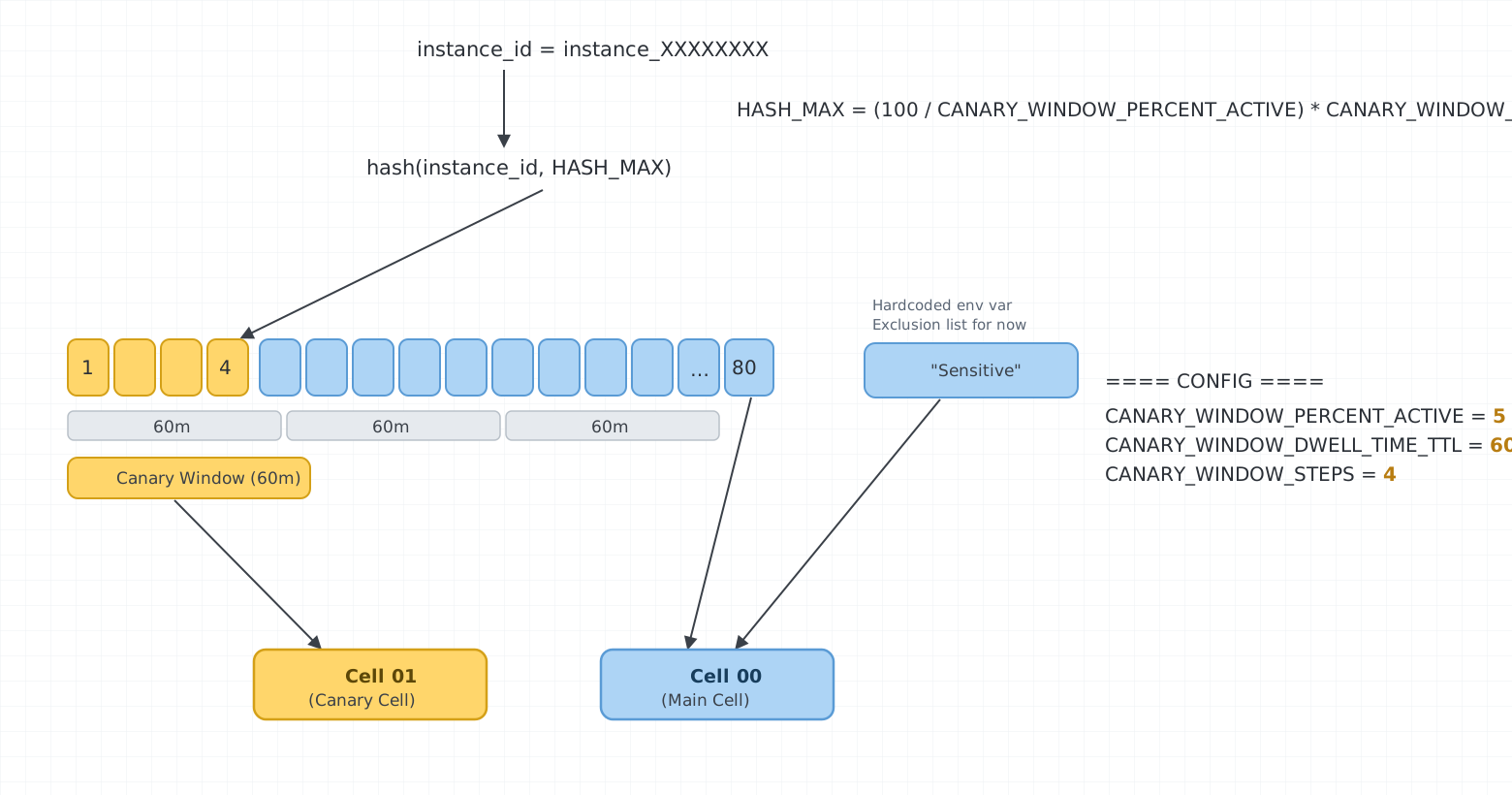
It’s an excellent diagram — clear, complete, and it captures the entire design at a glance. It shows you the shape: hash an instance ID into one of HASH_MAX buckets, a window covers some of them, covered buckets go to the canary cell, everything else to the main cell, and “sensitive” enterprise instances bypass the whole thing. If anything, the fact that one sketch holds the whole scheme is a credit to the design.
But that’s the ceiling of the medium, not the drawing: no static diagram, however good, can answer the questions that actually matter:
- If I set
PERCENT_ACTIVEto 5%, how long until the whole fleet has cycled through the canary? - When the window advances one step, how many instances churn in and out — and is that gentle enough?
- What does “5% live” actually feel like across 240 instances?
These are questions about behavior over time. A static picture is the wrong tool. What I wanted was the thing that taught a generation of engineers how Raft works: a model you can press play on.
So I had it built
I described the algorithm to Claude — roughly the two paragraphs above plus the formula — and asked for “a simple web page that emulates and displays” it, “like the Raft consensus visualization.” A few minutes later I had a working single-file emulator. Then the interesting part started: I could revise the design just by describing the change, and the working model updated to match — no editing code by hand.
The first version rendered the window jumping by its full width each step — swapping the entire canary population out at once. That’s too aggressive, and Brandon and I already knew it: we’d been on a video call working this out, and we’d decided the window should creep one bucket at a time so only a sliver of traffic churns per step. The model didn’t get that wrong so much as I never told it — that detail was in our heads, not in the two sentences I’d handed over. But here’s the thing: I caught the gap in seconds, because a running artifact makes a missing assumption glaringly obvious in a way a paragraph of prose doesn’t. “Make it slide one bucket at a time,” I said, and the churn dropped to a quarter of what it was — matching what we’d meant all along.
Then: “add a graph showing the churn per step.” That graph made the safety property visible — every instance entering the canary is mirrored by one leaving, so the live set stays pinned at exactly the configured percentage. We’d asserted that invariant on the call; the chart let me see it hold.
Here’s the result, running:
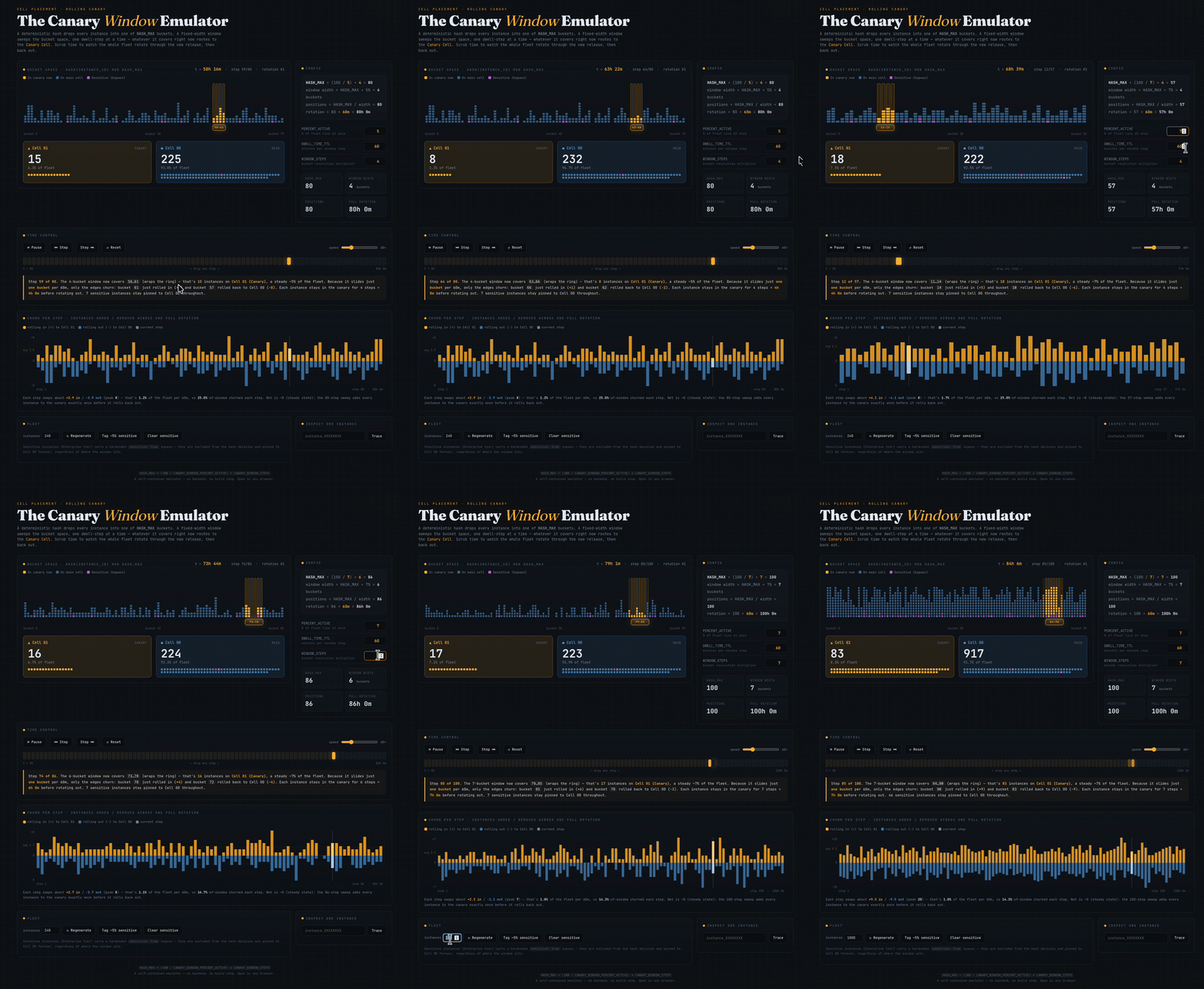
You can play with the real thing here. Scrub the timeline, change the config, regenerate the fleet, tag instances as sensitive, trace a single instance through its rotation schedule. It’s the difference between reading sheet music and hearing the piece.
Why this is high-leverage now
None of this is a new idea. Good interactive explainers — Raft, Bartosz Ciechanowski’s mechanical essays, the D3 gallery — have always been the gold standard for understanding. The reason we didn’t all build them is that they were expensive. A custom visualization was a day or three of fiddling with canvas math and animation timing for a thing you’d use once. The economics said: just write the doc.
LLMs have flipped that math. The marginal cost of a bespoke, throwaway visualization is now a conversation. And that changes which problems are worth visualizing — which is to say, nearly all of them. A few things I’ve noticed make it work:
- The behavior is the point, so simulate it. Don’t ask for a picture of the algorithm; ask for a model you can run. The bugs hide in the time dimension.
- Revise the design in plain language. “Slide one bucket at a time,” “add a churn graph” — each was one sentence, and the model re-rendered to match. The cost of trying a design is now low enough that you try more of them, and trying more of them is how you find the right one.
- The artifact outlives the conversation. A diagram in a Slack thread dies in the thread. A standalone page is something I can send a teammate, link in a design doc, or open again in six months when I’ve forgotten how the thing works. (This one is a single self-contained HTML file — no build step, no backend.)
- Verification falls out for free. Re-implementing the algorithm in a visualization is itself a check on whether you understand it. If the chart looks wrong, your mental model was wrong.
The whiteboard sketch and the live emulator describe the same algorithm. But only one of them made it obvious the moment my spec was incomplete, only one of them let me see the safety invariant hold, and only one of them is still useful tomorrow. The gap between them used to be a few days of work. Now it’s the length of this blog post.
Draw less. Simulate more.